

After several months of hard work, the moment has finally arrived: the new version of our dashboard is now live at control.superspace.nl! In this blog post, I’ll give you a quick overview of all the new features. A more detailed blog post covering each feature in depth will follow later.
Are you currently using dashboard.superspace.nl? If so, nothing will change for you for the time being—everything will continue to work just as you’re used to. You can find the new dashboard at control.superspace.nl.
Over the coming weeks, we will be working step by step on the migration to this new environment. We will be migrating existing customers in phases; you don’t need to do anything yourself, and we will let you know in advance. New customers can already order services via control.superspace.nl.
In short, this release is all about:
- Domain registration and management right in the dashboard, integrated with your site
- A free domain name with every site (limited to certain domain extensions)
- Manage your own security (WAF) and CDN directly from the dashboard
- An updated ordering and billing system with more payment options
Domains
The biggest new feature is the integration of domain registration. To make this possible, we’ve significantly overhauled the ordering process and added domain management alongside DNS.
Ordering Process and Registration
The new ordering process is now a single, seamless process. When ordering a website, you’ll immediately be given the option to register or transfer a domain name and link it—you can check availability right away, get multiple suggestions (.nl, .com, .be, …), and pay for everything in one go.
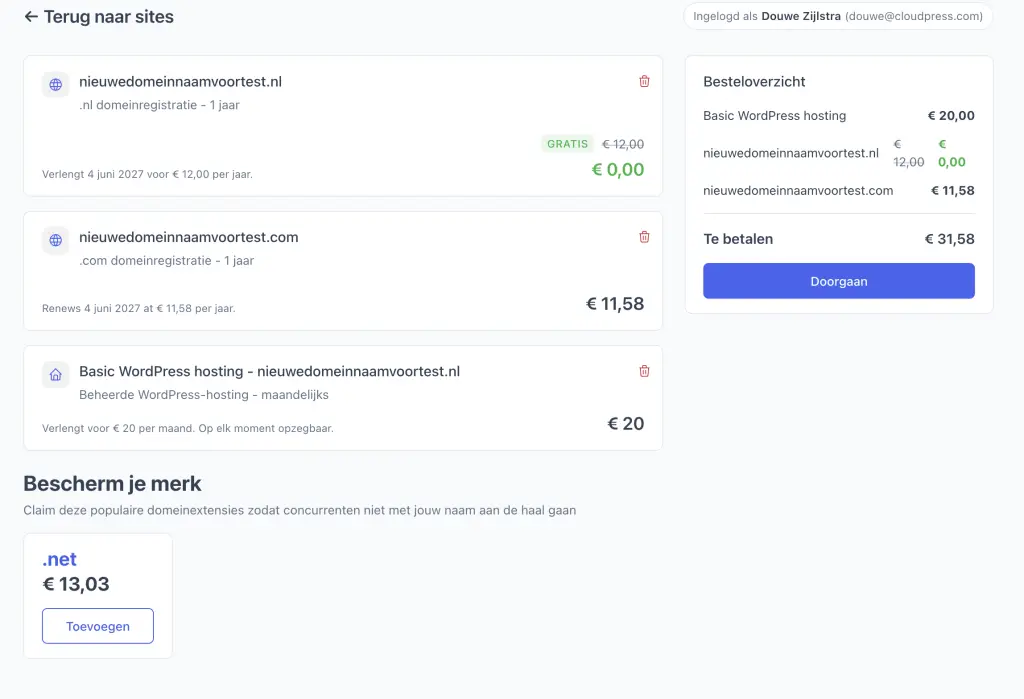
Everything happens in a single process: no separate DNS settings—everything is linked automatically and goes live quickly. And if you purchase a CloudPress site, you’ll get a free domain name with your package.
By the way, domains can also be purchased separately: you can register, transfer, and manage a domain name without having a website associated with it.
Domain Management & DNS
In addition to registering a domain name, proper domain management is, of course, essential. You can now configure everything related to your domain right in the portal: DNS, DNSSEC, nameservers, contact information, transfers, and renewals—you name it.
The DNS editor has received a few improvements: a more user-friendly interface for creating records and several new record types.
Security & CDN
Bunny CDN and its associated firewall (WAF) have already been running behind the scenes to make your site faster and more secure. What’s new is that you can now manage this yourself from the dashboard. This allows you to configure the WAF to your liking, with protection against attacks, bot detection, rate limiting, and access lists. You can also set up edge rules.
The settings available depend on your plan.
Payments and Billing
Also important: a new billing system. Are you already a customer? If so, things will continue to work the same way for now. New customers will place orders and make payments through the new system.
What's changing:
- Credit upon cancellation or reduction — If you cancel a service early or downgrade it, you’ll receive a credit for the remaining paid period in your account. You can use that credit to order or upgrade another service.
- View invoices, credit memos, and orders – neatly formatted invoices and credit memos that you can download right away, along with an overview of your orders.
Next steps
We’re still a long way from where we want to be, but with this version, we’ve taken a big step in the right direction. Soon we’ll be able to import existing domains, and after that, cPanel will be added to this environment—so we can fully replace the old dashboard with this modern environment.

