

Good news!!! Superspace introduces a new functionality on the CloudPress platform that makes it even easier to manage and organize your websites: subusers and subaccounts. From now on, you can create accounts and give end users access to specific sites without giving them access to sensitive account information or other sites. In this blog, we explain how it works and what the benefits are.
What are subaccounts?
Everyone with a website on the CloudPress platform has their own account. Websites are always associated with an account. With the new subaccount functionality, you can now group sites within an account. This means you can create separate subaccounts for different sites, with their own settings and payment options (monthly or yearly). Billing remains centrally controlled through the main account, which keeps management clear.
Users and roles
Each user in CloudPress logs in with a personal account. By default, each main account has one "Account Admin. Users can be members of multiple accounts, which is useful if, for example, you are a CloudPress customer yourself but also work with a reseller.
If you invite a new user who does not already have a CloudPress account, a new account is automatically created. Does the person already have an account? Then the person will receive an invitation that must be accepted first.
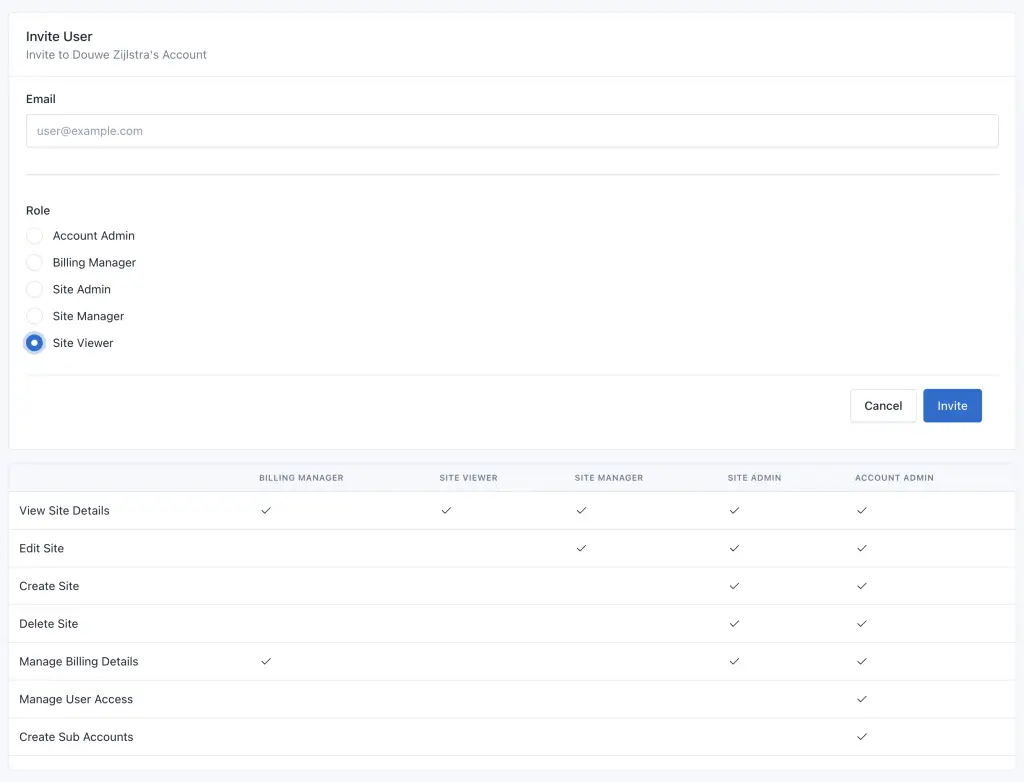
Within CloudPress, there are different roles with specific rights. When you create a user, you'll also get an overview of the different roles and permissions. For example, you can give someone the role "Site Manager," which allows them to manage websites, but not upgrade, downgrade or create new sites.
A practical example
If you host a website with CloudPress, and you want to give your customer access to that site; first, you can place the site in a subaccount. Then you can create and assign a subuser to data subaccount, so that your customer can access his or her site through this subuser.
What does this mean to you?
This new feature gives you more flexibility and control over your account and users. Whether you are a web agency that wants to give clients access to their own sites, or a company that works with multiple users - subaccounts make management simple, more efficient and secure.
Should you have any questions about this new functionality, we will of course be happy to help you further

