

Thanks to our three layers of caching, we at CloudPress can ensure that your site continues to perform optimally on our platform. With our new cache management interface for CloudPress, managing and emptying (purging) the cache becomes super easy! In this blog post, I introduce the new cache management interface and give a brief overview of how these cache layers work.
Maintenance
Before we can roll out the cache management feature, we need to update all the underlying WordPress containers. This will take place on Friday night, April 11, starting at about 02:00. Updating the containers may take a few seconds to a minute at most for each site, during which your sites will be down for a very short time. Once all sites have been updated, we can put the new interface live.
Interface
And there it is! The new interface allows you to empty (purge) each cache layer individually, or turn it on and off completely. While we recommend leaving all cache layers enabled for optimal performance, this feature is super handy if you're developing your site, for example, or trying to troubleshoot a problem.
Under normal circumstances, manual cache emptying should not be necessary. CloudFlare caches only static files such as images, JavaScript and CSS, and with both Nginx and Redis cache management, automatic emptying when changes occur is already handled by default by plugins.
However, should you need to manually empty the cache on a regular basis, please feel free to contact us! We'll be happy to help you figure out why it's not happening automatically.
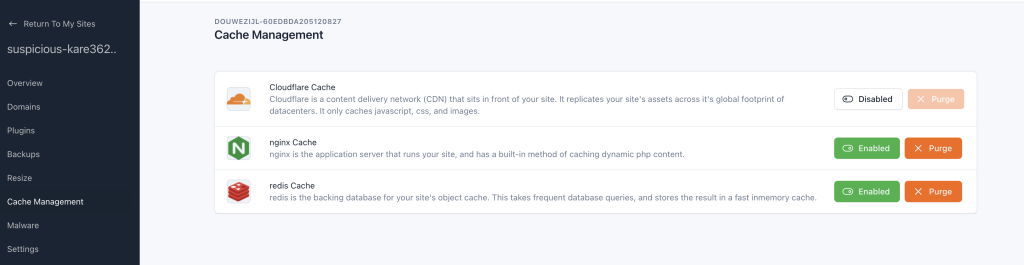
Cache layers
Here is another brief overview of our three cache layers and their functions:
CloudFlare: CloudFlare primarily acts as our Content Delivery Network (CDN). It optimizes images and cachet static files to improve site performance. The optimized version of your site is replicated to over 300 Cloudflare data centers worldwide. This way, your website loads quickly anywhere, anytime.
Nginx: Nginx is the web server responsible for handling requests and running and caching your site's PHP code. The Nginx Helper plugin on your site causes this cache to be emptied when updating your site.
Redis: Redis offers, through the Object Cache Pro plugin, persistent object caching. In WordPress, an object cache stores database queries, resulting in faster response times and less CPU load on the database server.

